For towing & patrol companies
Add cite-and-collect to the patrol you already run
Ticket the cars that don’t need a hook, collect online under your name or your client’s, and record every tow and boot with photos. One workspace per client if you want it, and a monthly report for each property owner.
- Your brand on everything
- You keep your own Stripe account
- No special hardware to buy
Sound familiar?
The problems this solves
Every violation is a tow or nothing
A car ten minutes over doesn’t justify a truck roll, so it gets a pass. The violation goes unrecorded, and the property owner wonders what the patrol is for.
Tow disputes come down to memory
When a driver claims the sign was missing or the car was authorized, a dispatcher’s recollection is not evidence. Photos, timestamps, and a plate history are.
Clients want numbers, not a phone call
Property owners ask how many patrols, how many tickets, and how much was collected. Pulling that together by hand for each client eats the end of every month.
- Review contests with the available evidence
- Drivers can attach photos or PDFs. Staff review the citation, history, photos, and saved plate-check context when available, then download a dispute packet. A staff member makes the decision.
- Sales, collections, and payment-system health
- Separate sales, collected payments, refunds, and tax in the Money report, with Stripe payouts alongside them. Check stale or failed outside-session syncs before patrol. Merchant invoices are reported separately.
- Ticket from the phones your drivers carry
- Scan the plate, photograph the violation, and issue a citation with the right escalating fine. The scan checks the property’s roster and any paid sessions first, with validity rules and verification warnings available to the officer.
- Record tows and boots with evidence
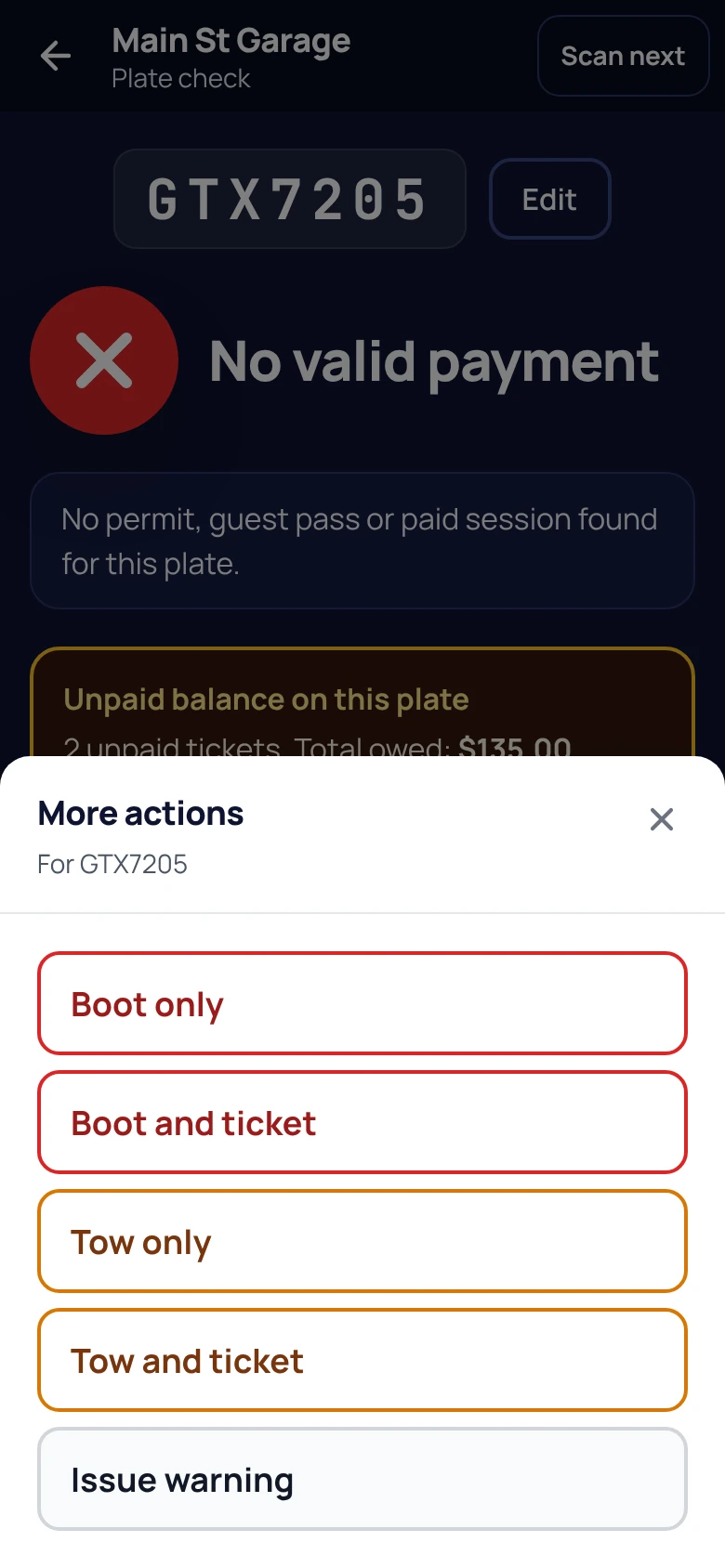
- From More actions after a scan, the officer records a tow or boot with photos and the reason, and calls your dispatch in one tap. Every tow and boot sits on the plate’s history and in the admin.
- Switched off until you ask
- Towing and booting start off on every account, and Lotably turns them on when you ask. Lotably does not check whether they are allowed where you enforce: you are responsible for following the law, and you assume all risk of using them.
- Collect online, settle to the right account
- Drivers pay by QR, plate, or ticket number in about 30 seconds. Payments run through Stripe Connect to whichever Stripe account the workspace connects, yours or the client’s, and Lotably never holds the money.
- One workspace per client, if you want it
- Run every client’s lots under your brand in one workspace, or give a client their own white-label workspace with its own fines, branding, and payout. Permissions control what each driver and dispatcher can see.
- Monthly reports for property owners
- A monthly property report per lot, ready to send to the owner, plus live dashboards, CSV/JSON export, and an audit log of every action by every user.
What operators ask us
Go deeper
Parking enforcement software for towing companies: the full guideRun your numbers
Citation revenue calculator
What evidence is available when a driver contests a ticket?
Staff can review the ticket, officer photos, the driver’s statement and attached photos or PDFs, and the saved plate-check context when available. A downloadable dispute packet brings the record together. An optional AI recommendation assists review; staff make the decision, and the AI does not review the newly attached driver files or the saved plate-check record.
Does Lotably dispatch the tow truck?
No. Lotably records the tow with photos, the reason, and the tow company chosen, and gives the officer a one-tap call to that company’s dispatch phone. Your dispatch process stays as it is; what changes is that every tow has a record.
Why do towing and booting start switched off?
Because what a private operator may tow or boot, and with what notice, varies by state and city. Every account starts with both off. If you ask for them at signup, Plan & account shows them as Requested until Lotably turns them on. Lotably does not check whether they are allowed where you enforce: you are responsible for following the law, and you assume all risk of using them.
Can we run each property-owner client separately?
Yes. You can enforce every client’s lots under one workspace, or set up one workspace per client or brand with its own branding, fine schedule, and Stripe payout. Each workspace’s data is isolated, and a monthly property report per lot goes to the owner.
Where does the citation money go?
Through Stripe Connect, as direct charges to the Stripe account connected to the workspace, which can be yours or the client’s. Lotably takes 12% of online payments on the Free plan ($0/month, up to 2 lots) or 5% on Starter ($99/month, up to 25 lots); Stripe’s processing fees are separate.
Turn the cars you don’t tow into revenue.
Sign up online, add your first client’s lots, and start citing the same day. No sales call.
No credit card for the Free plan · Month to month · Questions? Call +1 (513) 348-3049